How AI Organized 1,800+ Race Photos (and Drone Videos)
How Google Cloud Vision auto-tagged 1,843 race photos and drone videos by bib number — a 92% detection rate, and what we did about the other 8%.

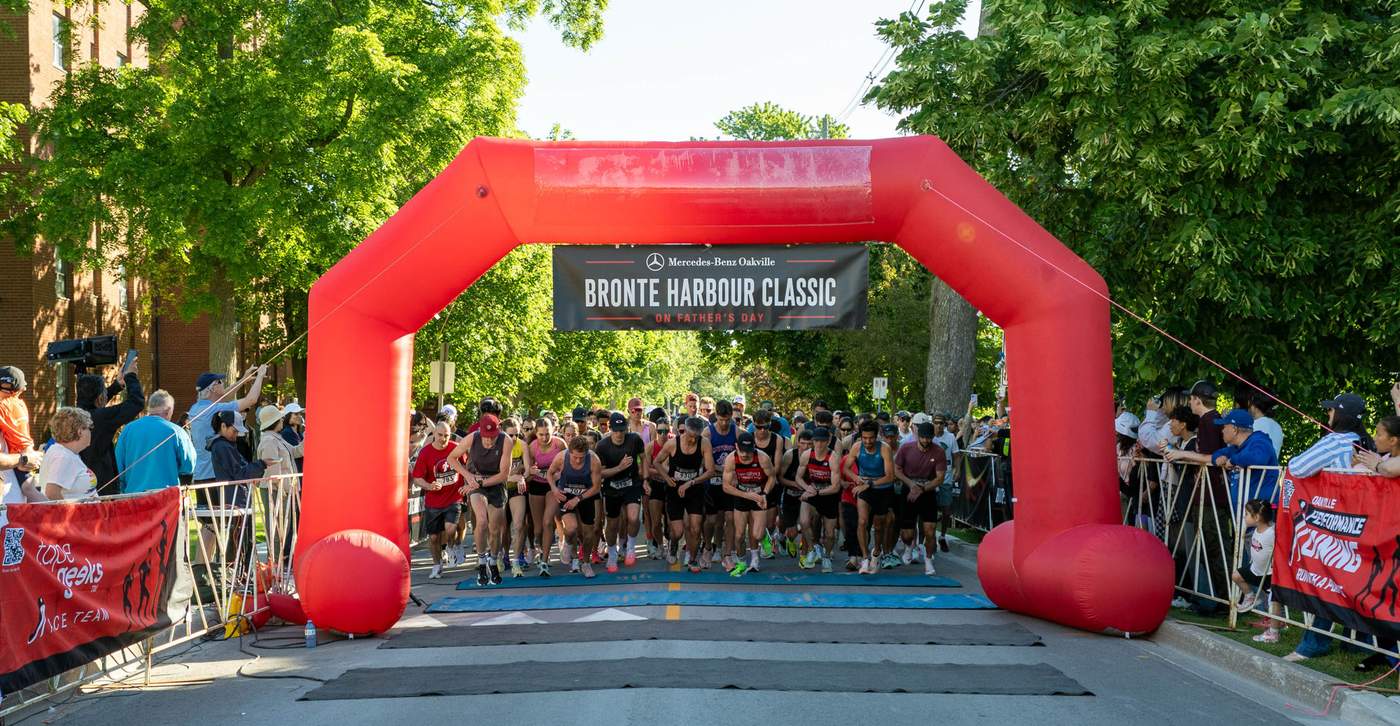
This is Part 2 of Building a Digital-First Race — a series on the digital and AI decisions behind the Mercedes-Benz Oakville Bronte Harbour Classic 5K, and why we made them. Last time: why we archived every race forever. Coming up: why every sponsor and vendor gets a permanent web page, why our medals have QR codes, and how we built a race website that grows instead of starting over.
Four photographers and a drone team spent three hours on Bronte Heritage Waterfront Park on Father’s Day and came back with 1,843 photos and videos. That’s the easy part. The hard part is what happens next: somewhere in that pile is exactly the handful of frames that matter to each of the 875 people who ran. A finisher doesn’t want a folder. They want their photos — the ones with their bib number in them, found in under a minute, for free.
That’s a search problem, not a photography problem, and we built it as one.
Quick Answer: We ran all 1,843 race photos through Google Cloud Vision’s text detection to read bib numbers directly off runners’ shirts, then indexed every photo by bib, category, and moment. It auto-tagged 92% of photos correctly on the first pass. Runners search bronteharbourclassic.com/photos/ by bib number and get every photo they’re in, free, in seconds.
The problem every race photo gallery has
Go find a race photo gallery from almost any local event. It’s usually one of two things: a wall of thumbnails in chronological order with no way to search, or a paid platform that shows you a blurry preview and asks for $15 before you can download your own finish-line photo.
Neither respects the runner’s time. Nobody wants to scroll 1,800 photos looking for themselves, and nobody who just ran 5K on a Sunday morning wants to be upsold their own memory. We decided before race day that both of those experiences were off the table.
The constraint we set: a runner types their bib number, and within seconds sees every photo they appear in, full resolution, free to download. That constraint is simple to state and genuinely hard to deliver at 1,843-photo scale with two volunteers running the tech side.
What we actually built
The pipeline has three stages, and none of them required us to hire anyone.
Ingest. Every photo from all four photographers and the drone operator lands in one folder, named by camera and sequence, nothing manual yet.
Tag. Each photo runs through Google Cloud Vision’s text detection API, which reads any text in the frame — including the printed numbers on a runner’s bib. We match detected numbers against our registration list, and where a match is confident, the photo gets tagged with that bib number automatically. A single photo often has six or seven runners in it, so it can carry six or seven bib tags.
Categorize and publish. Alongside bib tagging, photos get sorted by where in the race they were taken — start line, course, finish line, Kids 1K, festival, awards — so people can browse by moment even if they don’t know an exact bib number. The final counts from race day: course 813, finish line 341, Kids 1K 281, festival 217, awards 138, start line 53.
The result is a gallery where “search by bib 588” and “browse the Kids 1K” both work, served from a static site with no login and no checkout page.
The number that matters: 92%, and what happens to the other 8%
Automatic bib detection worked on 92% of photos where a bib was visible and legible. That’s a strong number — high enough that most runners find themselves without any help from us. It is not 100%, and I want to be straight about why.
Bib numbers get obscured by arms mid-stride, folded into a runner’s shirt, angled away from the camera, or just too far from the lens to resolve at 2,400 pixels wide. OCR reads what’s actually in the frame; it can’t reconstruct a number the camera never captured cleanly. For the remaining photos, a human — usually me, on a Tuesday night — reviews and tags manually, which is slow but not hard.
The honest limitation: if a runner searches their bib and comes up short, that doesn’t mean the photo doesn’t exist. It means try their name, or browse by category and moment, or email us and we’ll do the manual look ourselves. We’d rather admit the gap than pretend the automation is flawless.
The drone footage got its own treatment
Nine drone chapters covered the full morning — the start corral filling along Ontario Street facing west, the course along the waterfront, and the festival spread across the park. Bib detection doesn’t help here; a drone shot from height doesn’t resolve individual bib numbers, and video isn’t a single frame to run OCR against anyway.
So the drone footage is organized differently: by chapter and moment rather than by runner, sitting in the same photo gallery as the stills. It’s the wide view that complements the close-up, and it’s the piece people share the most — watching 875 people fill a street from above hits differently than any single ground-level photo.
We cut a condensed version into an official highlights video that’s now on the race homepage. It’s become our best recruiting tool for 2027 — nothing sells a first-time runner on next year’s race like watching this year’s finish line.
The economics: why giving 1,843 photos away for free actually works
The obvious question: how do you host and serve nearly 2,000 full-resolution photos and videos, for free, forever, without the bill becoming the whole budget?
We started on a media platform that would have run roughly $99 a month indefinitely just to keep the gallery live. In June we migrated everything to Cloudflare R2 object storage with pre-generated thumbnail, view, and download variants for each photo. R2 charges nothing for egress, which is the line item that actually kills a photo-heavy site’s budget. The ongoing cost dropped to effectively zero.
Combine that with a static front end — no server rendering a gallery on every request, just pre-built pages hitting a JSON index — and “give away 1,843 full-resolution photos forever” stops being a cost decision and becomes a formatting decision.
What this means beyond the runner
The bib-tagging pipeline pays off twice — once for the runners and once for the sponsors. Runners get instant, free access to their own photos. But every sponsor and vendor from our 80-page 2026 directory also gets AI-tagged into any photo their booth, banner, or team appears in — so their permanent page isn’t just a logo, it’s photographic proof they were part of the day. That’s a meaningfully different pitch to a business weighing whether to sponsor or run a booth at the vendor expo next June: instead of a promise, they see exactly how last year’s partners showed up in the gallery.
How to build AI photo search for your own event
You don’t need a computer vision background to run this pipeline — I’m a mechanical engineer, not a programmer, and I built it with AI doing the implementation work while I made the decisions. If you’re running a race, a festival, or any event with a photographer on site, here’s the sequence.
1. Shoot with search in mind. Brief your photographers to get bib numbers in frame when they can. It sounds obvious; most event photographers have never been asked.
2. Run every photo through an OCR/vision API. Google Cloud Vision, or an equivalent text-detection service, reads bib numbers the same way it reads any printed text. This is a few dollars per thousand images, not a research project.
3. Match detected text against your registration list. A simple lookup against known bib numbers turns “text found in image” into “runner tagged in photo,” and catches most OCR misreads by rejecting numbers that don’t exist in your race.
4. Categorize by moment as a fallback search path. Not every runner remembers their bib number three weeks later. Course, start, finish, kids’ race, festival, awards — simple categories cover the people who’d rather browse than search.
5. Publish to a static gallery, not a database-backed one. Pre-generate the image variants and serve from object storage. Traffic spikes hard in the week after a race and drops to near zero after that — you want a hosting bill shaped like that traffic, not a flat monthly server cost.
6. Tell people the accuracy rate, honestly. We say 92% because it’s true and because setting that expectation up front means a runner who doesn’t find themselves immediately tries a second search instead of assuming the gallery failed them.
Do those six things and a photographer’s memory card turns into a searchable archive instead of a folder nobody opens twice.
FAQ
How do I find my race photos by bib number?
Go to the event’s photo gallery and search your bib number directly — for the Bronte Harbour Classic, that’s bronteharbourclassic.com/photos/. If AI bib detection tagged your photos correctly (it worked for 92% of ours), every photo you appear in comes up instantly. If a search comes up empty, try your name or browse by category and moment instead.
How accurate is AI photo tagging by bib number?
In our first race, Google Cloud Vision’s text detection correctly tagged bib numbers in 92% of photos where a bib was visible. Accuracy depends on how clearly the bib is captured — arms, folds, angle, and distance all affect whether OCR can read the printed number. The remaining photos need a quick manual review to catch what the automation missed.
What tool do event organizers use to tag race photos automatically?
We used Google Cloud Vision’s text detection API, which reads printed text — including bib numbers — directly from photos and matches it against a registration list. It isn’t a race-specific product; it’s a general-purpose vision API applied to a specific problem, which is why any event organizer can set up something similar without custom software.
Why not just use a paid race photo platform?
Most paid platforms charge runners per photo, which turns a free memory into a transaction. We wanted every one of our 875 runners to leave with their photos at no cost, so we built the tagging and hosting ourselves on a static site with object storage — cheaper for us long-term than a monthly platform fee, and free for every runner.
Does AI photo tagging work on drone video too?
Not the same way. Bib-number OCR works on still photos with a clear frame; a drone shot from height doesn’t resolve individual bib numbers, and video isn’t a single image to scan. We organize our nine drone chapters by moment and location instead — the wide view of the whole race, sitting alongside the bib-searchable stills in the same gallery.
Next in the series: Why Every Sponsor and Vendor Gets a Permanent Web Presence — why 80 local businesses got their own page instead of a logo in a footer.
The runner-facing version of this story is on the race site: How to Find Your Race Photos (Search by Bib Number). And if you missed it, Part 1 covers why we archived the whole race forever.
Directing a race or running a community event? I help race directors build this same system.